
Welcome to this guide on how to create new Apple ID in Nepal. You can easily create a new Apple Account online through Apple’s official website using a web browser.
If you want to know how to create a new Apple ID in Nepal on the website for free, you can create an account through Apple’s official website. You do not need an iPhone to create the account. You can use your Gmail address and phone number to complete the verification process.
In this guide, we will explain how to create a new Apple ID in Nepal for free using a web browser on an Android mobile phone, laptop, or PC. The process is explained in simple, easy-to-follow steps so that beginners can create a new Apple Account without an iPhone.
Table of Contents
What Is an Apple ID and Why Do You Need One?
An Apple ID is an account that you need to sign in to the App Store, iCloud, Apple Music, and other Apple services. Apple ID is now called Apple Account.
If you are using a new iPhone or another Apple device, you need an Apple Account to download apps from the App Store, use iCloud, and access other Apple services.
Therefore, if you are planning to use a new Apple device, creating a new Apple ID account (Apple Account) can be useful before you start using the device.
What You Need to Create a New Apple ID in Nepal
Before you start creating a new Apple ID, keep some necessary information and things ready. When creating an Apple Account through Apple’s official website, you need a working email address, phone number, date of birth, and a strong password. If you want to know how to create new Apple ID in Nepal, make sure you have these details ready before starting the account creation process.
If you want to create an Apple ID with Gmail, you can use your Gmail address as the email address for your Apple Account. You also need a phone number that you can access to complete the verification process.
Before creating an Apple ID, keep these things ready:
- Gmail or working email address: The email address you want to use for your Apple Account.
- Phone number: A phone number that you can access for verification.
- Date of birth: Your date of birth, which is required when creating the account.
- Password: A strong and secure password for your account.
- Internet connection: A good internet connection to open the website and complete the account creation process.
You do not need a credit card or payment method to create a new Apple Account through the website. You can create the account for free. A payment method may be required later for certain purchases or paid Apple services.
How to Create New Apple ID in Nepal Online for Free: 2026 Guide
You can create a new Apple Account online for free by following these simple and easy steps. You can complete the process using a web browser on an Android mobile phone, laptop, or PC.
Step 1: Open Apple’s Account Website
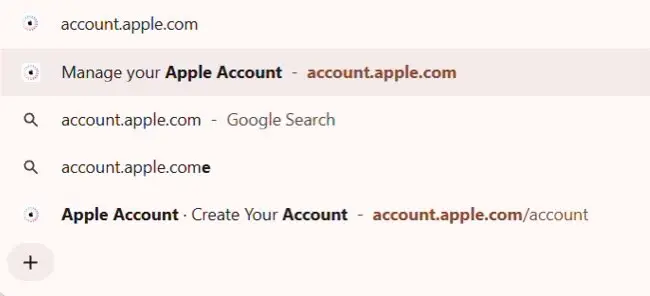
Open your preferred web browser and enter account.apple.com in the search bar.
Then, open Apple’s official Apple Account website.
Step 2: Select Create Your Apple Account
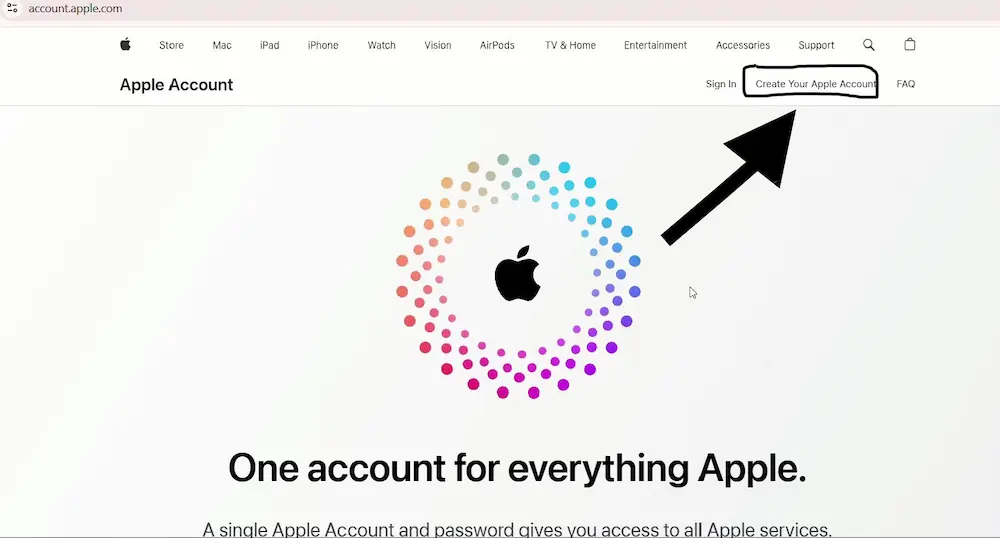
On the Apple Account website, click Create Your Apple Account to start creating your new account.
Step 3: Enter Your Name, Country, and Date of Birth
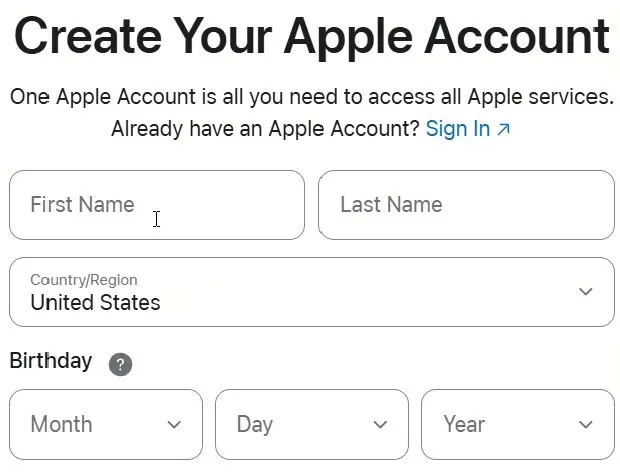
Enter your first name and last name in the required fields.
Then, select your country or region and enter your date of birth.
Make sure you enter your personal information correctly.
Step 4: Enter Your Gmail Address and Password
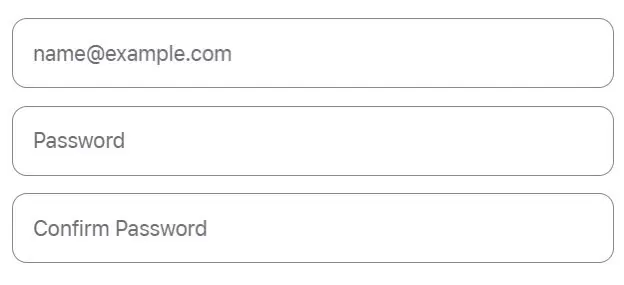
In the email field, enter your Gmail address or another working email address that you want to use for your Apple Account.
Then, create a strong password for your account and follow Apple’s password requirements.
Avoid using your name, phone number, email address, or other easily guessable information in your password.
For example, you can use a strong password such as Sita236@. However, make sure your actual password is unique and not easy for others to guess.
You can create an Apple ID with Gmail by using your Gmail address as the email address for your Apple Account.
Step 5: Enter Your Phone Number
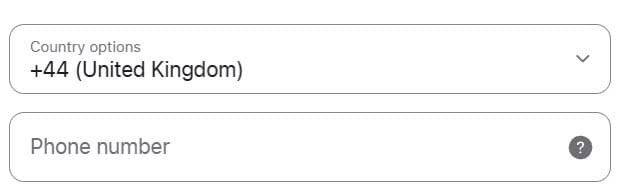
Enter your phone number in the required field.
Use a phone number that you can always access because Apple uses it for verification and may use it to help recover your account if needed.
Step 6: Verify Your Email and Phone Number
After entering your name, country or region, date of birth, email address, password, and phone number, click Continue.
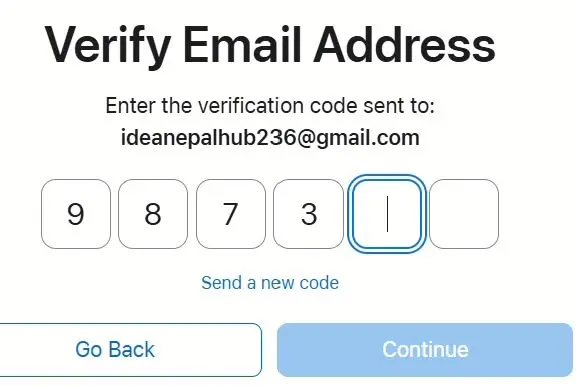
Apple will send a verification code to your email address. Enter the code you receive on the email verification page and continue.
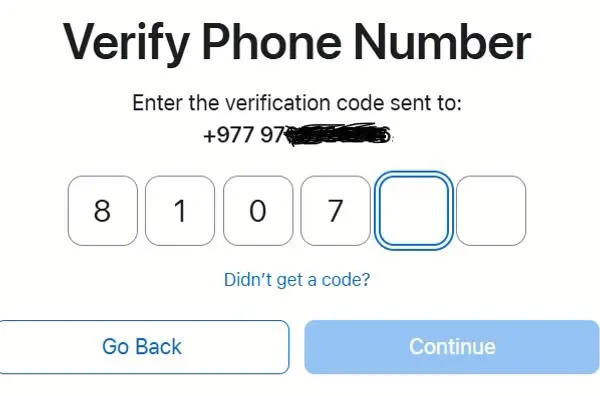
Apple will then ask you to verify your phone number. Enter the verification code sent to your phone number and complete the verification process.
Step 7: Sign In to Your New Apple Account
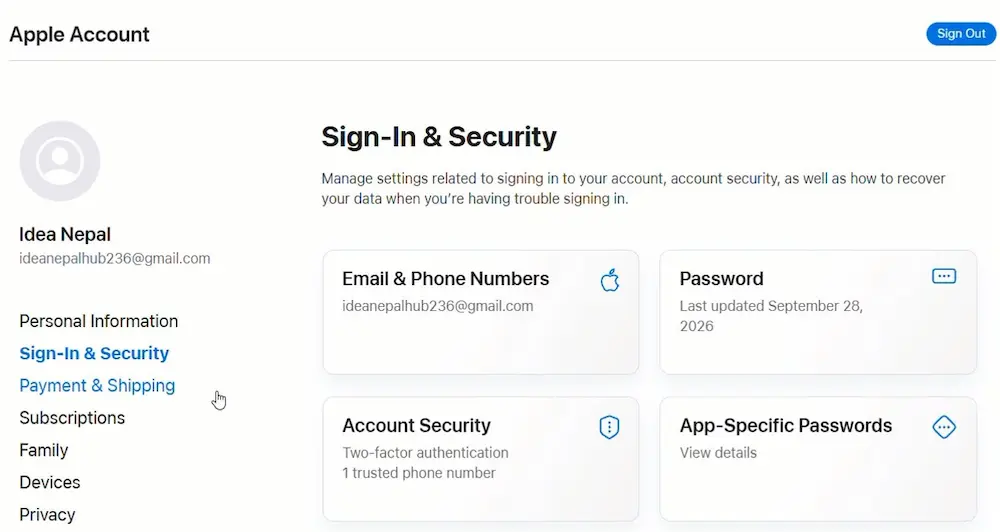
After completing the verification process, your new Apple Account will be created.
You can now sign in to your new Apple Account using your email address or phone number and password and use Apple services such as the App Store and iCloud.
How to Create an Apple ID with Gmail?
Yes, you can create an Apple ID with Gmail. When creating a new Apple Account, you can use your existing Gmail address as the email address for your account.
Your Gmail address can be used to verify your Apple Account and to sign in to Apple services such as the App Store, iCloud, and Apple Music.
If you already have a Gmail address that you use, you do not need to create another separate email address to create a new Apple ID. You can use your existing Gmail address when creating your Apple Account.
How to Create an Apple ID Without a Credit Card?
Yes, you can create a new Apple ID without a credit card. If you want to know how to create an Apple ID without a credit card, you can create an Apple Account through Apple’s official website without entering a credit card or making any payment.
You can enter the required information and create an Apple ID for free.
If you later want to purchase paid apps, subscriptions, or other Apple services from the App Store, you can add a payment method to your Apple Account when needed.
How to Create an Apple ID Without a SIM Card?
You can create an Apple ID without having your own SIM card. However, you need a phone number that you can access because Apple requires you to verify the phone number during the account creation process.
If you do not have your own SIM card, you can use a family member’s phone number or another valid phone number that you can access to receive the verification code.
Therefore, if you can receive the verification code on the phone number you provide, you can complete the Apple Account creation process.
Frequently Asked Questions
How Can I Create an Apple ID Account?
You can easily make a new Apple ID through Apple’s official website. Enter the required information, provide your email address and phone number, and complete the verification process to create your new Apple Account.
Can I Create an Apple ID with Gmail?
Yes, you can create an Apple ID using a Gmail address. When creating a new Apple Account, you can use an existing Gmail address that you currently use.
Can I Create an Apple ID Without an iPhone?
Yes, you do not need an iPhone to create an Apple ID. You can make a new Apple Account using a laptop, PC, Android phone, or another device through a web browser.
Can I Create an Apple ID Without a Credit Card?
Yes, you can create an Apple ID without a credit card. You do not need to make a payment to create an Apple Account.
Can I Create an Apple ID on Android?
Yes, you can also create an Apple ID on an Android phone. Open a web browser on your Android phone and create a new Apple Account through Apple’s official website.
Conclusion
You can easily create an Apple ID in Nepal without an iPhone using an Android phone, Windows laptop, or PC through Apple’s official website.
You can use your Gmail address and an accessible phone number to complete the verification process. If you want to know how to create an Apple ID without a SIM card, you may be able to use an accessible phone number for verification, depending on Apple’s requirements. You do not need a credit card or payment to create an Apple Account.
If you want to learn how to create an Apple ID without a credit card, simply open account.apple.com, enter your required information, and complete the account creation process. After creating your account, you can use services such as the App Store, iCloud, and Apple Music.
Now you know how to create Apple ID in Nepal on the website for free by following these simple steps.
Pingback: How to Delete a Gmail Account Permanently: Easy Steps (2026)
Pingback: How to Create a New Gmail Account in 2026 (Easy Steps)
Pingback: Best Apple iPhone 18 Pro Max Price in Nepal (2026)
Pingback: Top 10 Best Wireless Earbuds Under 1000 in Nepal (2026) - IdeaNepalHub